Arion
Discovery, Simplified.
Every document on your computer — instantly findable. No cloud required.
Version 1.0.4 · Windows 10/11 · 64-bit · 78 MB · Release notes
Discovery, Simplified.
Every document on your computer — instantly findable. No cloud required.
Version 1.0.4 · Windows 10/11 · 64-bit · 78 MB · Release notes
What Arion is
Arion is a Windows desktop application that builds a searchable, full-text index of the documents on your computer — PDFs, Word files, spreadsheets, EPUB books, web pages, archives, and (with Family or Archive editions) your connected cloud storage accounts and the spoken contents of video and audio files.
Search returns matching documents in milliseconds with snippets showing exactly where your terms appear. Optional AI features (Family and above) add semantic search and natural-language question-answering, powered by either your own Microsoft Azure subscription or a local AI model running on your hardware via Ollama.
Arion runs in infrastructure you control. By default — and always for the free Personal edition — your documents, your search index, and your queries stay on your local machine. If you opt into Tier 2 cloud AI (Family or Archive editions), Arion talks to your own Microsoft Azure subscription, not ours. Either way, nothing is ever uploaded to Chordalia Systems. The free Personal edition handles libraries up to 5,000 documents; Family and Archive editions are one-time purchases per major version.
You have years of documents — PDFs, Word files, spreadsheets, research notes — scattered across folders you half-remember. Arion indexes all of it and makes it searchable in a single search bar. No subscription required, no vendor holding your files. It works like a search engine for your own computer.
PDF, Word, WordPerfect, EPUB, HTML, spreadsheets — Arion reads and indexes the content of each file, not just the filename.
Arion lives in your system tray, ready to answer questions the moment you open the search window. Background indexing runs at low priority so it never competes with your foreground work — and can optionally launch at Windows login so your library is always indexed and ready. Open. Search. Get your answer. Get back to work.
Daily automatic scanning keeps the index current. New files show up in search without you doing anything.
No internet connection required. Your documents never leave your computer unless you choose to enable cloud AI features.
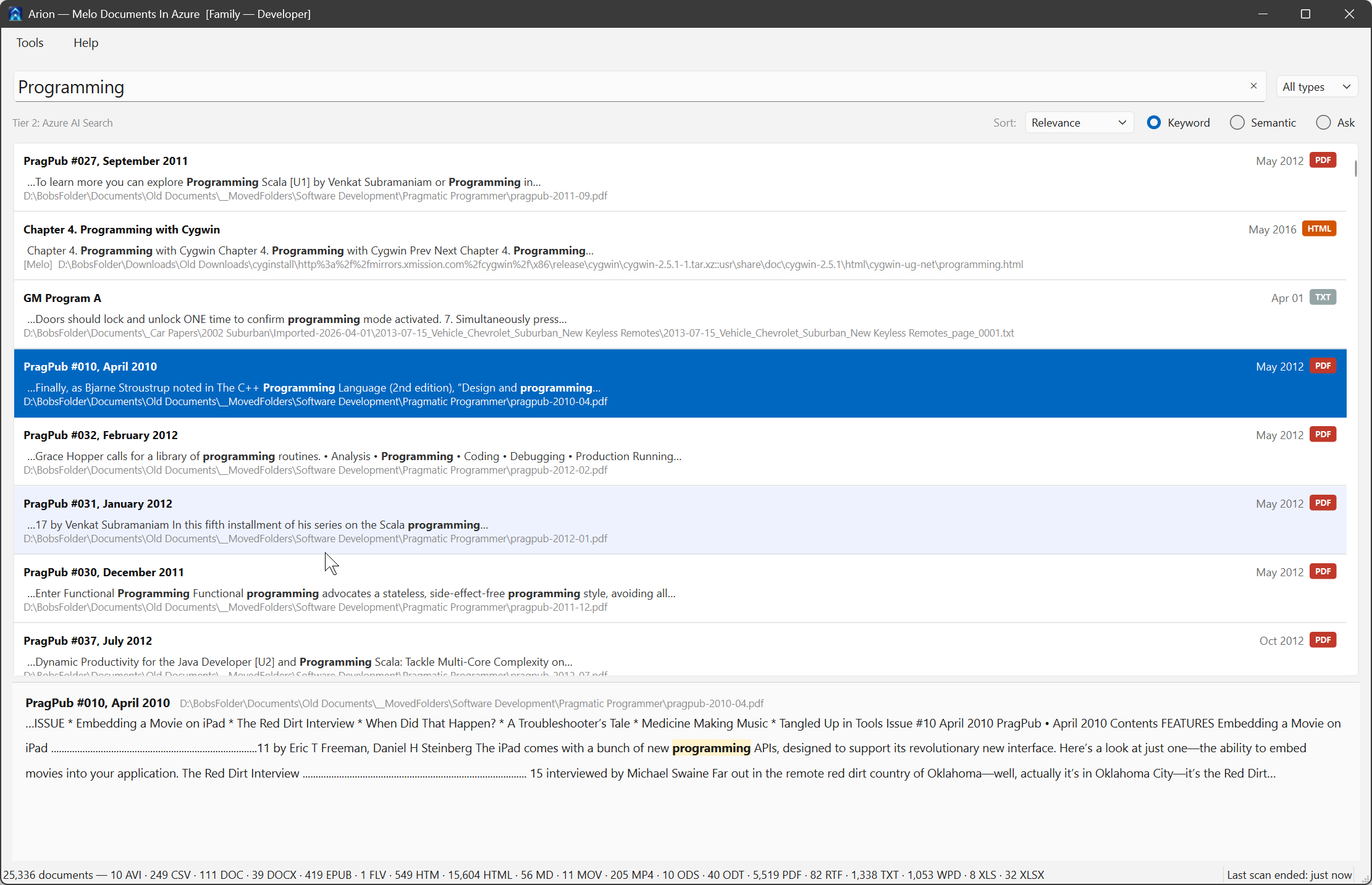
Full-text search returns results in milliseconds. Snippets show exactly where your search terms appear in each document.
Click any result to see a content preview right in the search window. Find exactly the passage you need before opening the file.
MP4, MKV, MOV, MP3, M4A, FLAC, WAV and more — faster-whisper transcribes speech so your recordings are fully searchable. The transcription engine is a one-time ~65 MB download from inside Settings (shared with Cadenzium and any future Chordalia products on the same machine).
Search your photos by content. An Ollama vision model describes each image — search for "beach sunset" or "birthday cake" and find matching pictures.
Go beyond exact keywords. Semantic search finds conceptually related documents — search for "vacation" and find files that mention "holiday" or "time off."
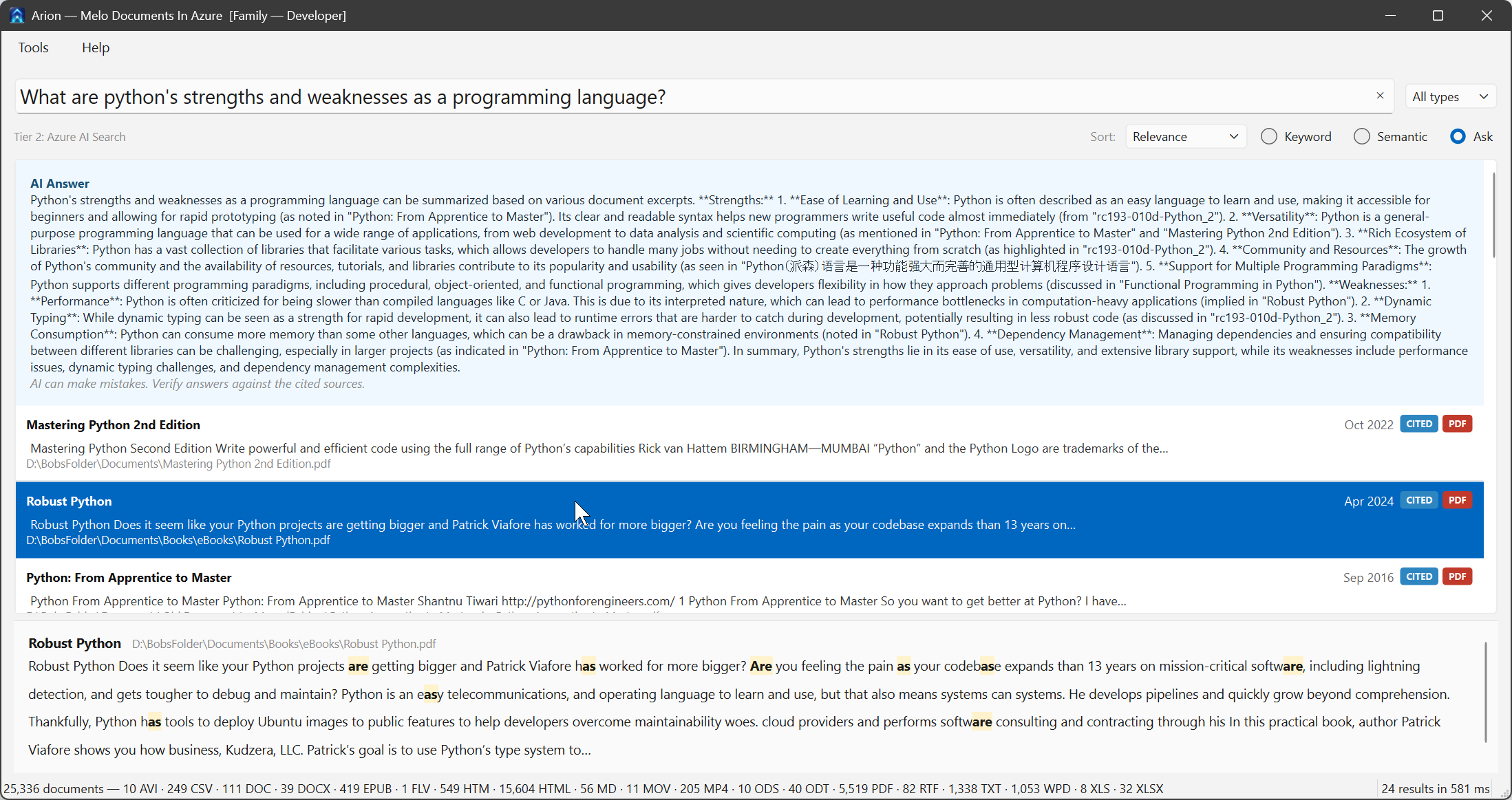
Instead of keywords, ask in plain English. AI reads the relevant documents and gives you a direct answer with source citations.
Hybrid retrieval combines meaning-based semantic search with keyword matching — so even questions about a single specific term reliably surface the documents that actually contain it, even buried deep in a long ebook or report.
Semantic search and question-answering can run entirely on your hardware via Ollama — no data sent anywhere, even for AI features. Archive's image description uses the same local Ollama path.
Configure exactly which drives and folders to index. Exclude system folders, temp files, or anything you don't want in search results.
Run separate indexes for different collections — one for documents, one for ebooks, one for a shared library. Each configuration can autostart independently, and you choose whether closing the search window quits Arion or keeps it running quietly in the tray. Personal edition runs one Arion instance at a time.
Double-click any result to open the file in its native app. Arion finds it; your usual tools handle the rest.
Supported file formats:
With Family or Archive editions, Arion can answer questions across your documents — not just match keywords. Every answer cites the source documents it came from, so you can verify and dig deeper.
Start free. Upgrade when you need AI.
Download Arion and have your first search results in minutes.